Convert PDF to Excel
Extract tables and data from PDF to Excel format
Upload PDF File
Drag & drop your PDF here or click to browse
Supports PDF documents • Max 50MB
Converting PDF to Excel…
Extracting data from PDF
This may take a few moments…
Document
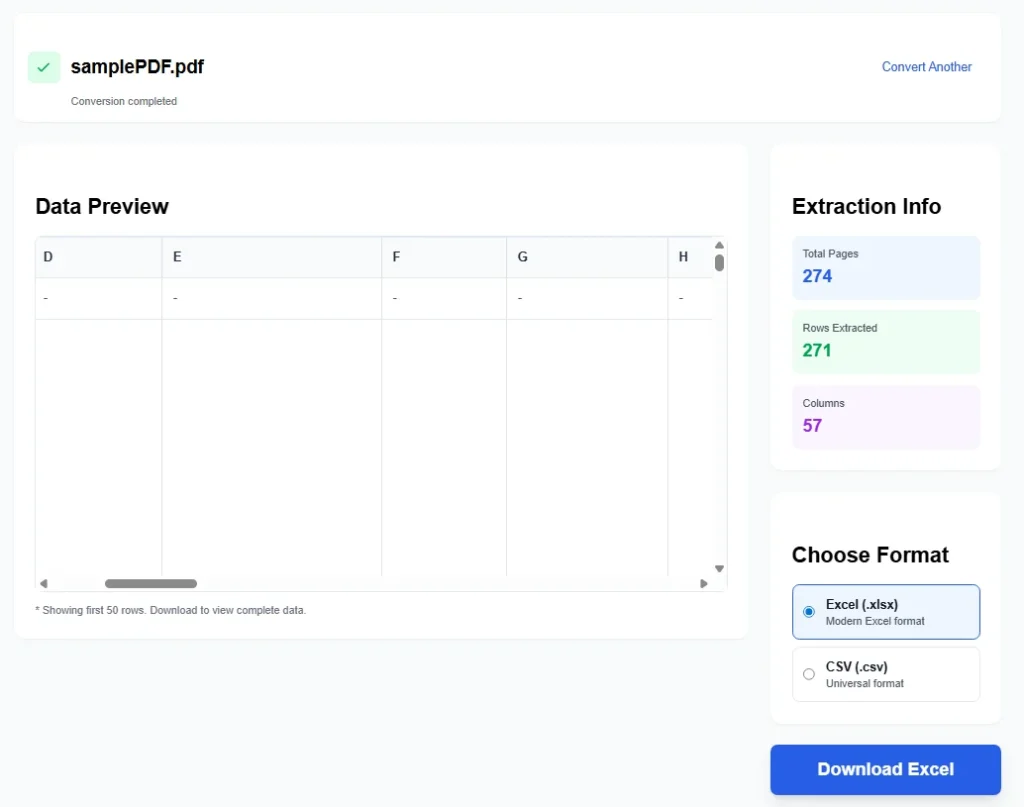
Conversion completed
Data Preview
* Showing first 50 rows. Download to view complete data.
Extraction Info
Choose Format
Do you need to convert PDF to Excel fast and free? Our online tool does exactly that. Upload your PDF file and get an editable Excel spreadsheet in minutes. No downloads, no Adobe Acrobat, no Microsoft Office required.
This browser-based web app converts PDFs directly on your device. It extracts data from PDFs, including regular PDF files, scanned PDFs (if text is selectable), and complex PDF documents. The converter handles PDF tables and regular PDF text well.
Users often search for an Acrobat PDF to Excel converter tool. Our free alternative works just as good for most needs.
Step-by-Step Guide to Convert PDF to Excel
Here is how to use the tool:
- Open the page and find the upload area.
- Click it or drag your PDF file in.
- The tool loads the file. It shows name, size in KB, and total pages.
- View the page grid. Check boxes to select pages.
- Use “Select All Pages” for the whole document.
- Choose extraction mode: Text (default), Table Detection, or Structured Data.
- Pick output format: .xlsx (modern Excel), .xls (Microsoft Excel 2003), or .csv.
- Toggle “One Sheet Per Page” for separate sheets.
- Turn on “Preserve Formatting” to keep styles.
- Click “Convert to Excel”.
- Watch the progress bar during processing.
- When complete, download the file.
No converter installation needed. No account or sign-up.
Key Features of This PDF to Excel Tool
This free converter offers handy options:
- Convert entire PDFs or just selected pages. Perfect for multiple PDFs processed one at a time.
- Page selection grid with previews.
- Different modes for better data extraction.
- Create one sheet or many.
- Output as XLSX document, older .xls, or CSV.
- Supports editable Excel files and editable Excel spreadsheets.
- Works great with Microsoft Excel, Microsoft 365, MS Office, and other office suite apps.
- Builds proper Excel rows and columns.
- Shows stats after conversion: pages converted, sheets created, data rows.
Many use it for document management. Pull info from PDF file format into Excel documents or Excel files.
Skip slow copy and paste. Avoid messed up layouts.
The tool even tries table detection in PDF tables.
Why Choose This Online PDF to Excel Converter?
People want to convert PDF to Excel without paying. Tools like www.ilovepdf.com or Acrobat PDF options cost money. Ours is free forever.
You can easily convert your PDFs into editable Excel files. Turn locked PDF documents into open spreadsheets.
Great for Excel enthusiasts. Practice spreadsheet skills with real-world data from PDFs.
No server upload means better privacy. Everything processes in your browser.
The converter works on phones, tablets, or computers.
Use it for any conversion purposes. Handles most PDF files under 10MB.
Common Uses and Examples
This tool shines in daily tasks:
- Extract financial tables from reports to Excel for calculations.
- Move lists or forms from PDFs to spreadsheets.
- Handle office invoices, receipts, or inventories.
- Convert downloaded PDF documents for editing.
- Work with data in Microsoft Office compatibility modes.
Turn static content into a new spreadsheet. Add formulas right away.
For document work, it saves hours.
Tips for Best Conversion Results
Get great output with these tips:
- Choose clear, text-based PDFs. Avoid heavy images only.
- Test table mode for columnar data.
- Use structured mode for key-value pairs.
- Keep “Preserve Formatting” on for styled text.
- For large files, split PDFs first.
- Combine with other online PDF tools if needed, like merge or sign PDFs.
The converter tool keeps things simple and effective.
Supported Formats and Limits
- Input: Any standard PDF.
- Output: Excel files in .xlsx, .xls, or .csv.
- Max size: 10MB per file.
- No limit on number of conversions.
Full support for Microsoft products and beyond.
Alternatives and Why This Stands Out
Paid options exist, but this free converter matches basic needs.
No ads, no watermarks, no upsells.
Focus on core conversion. Reliable and quick.
Start Converting Today
Ready to convert? Upload a PDF now.
Get your Excel document or Excel file instantly.
Improve your workflow with this easy tool.
Enjoy seamless PDF to Excel conversion for free.
This online convert PDF tool makes life easier.
Try different options to see what works best.
Happy converting!
FAQs
1. Is this PDF to Excel converter completely free?
Yes. You can use it as many times as you want. No sign-up, no payment, and no limits on conversions.
2. Does the tool work with scanned PDFs?
It works best with text-based PDFs where text is selectable. For scanned or image-based PDFs, results may be limited since no advanced OCR is included. Use clear, selectable text PDFs for best output.
3. What is the maximum file size I can upload?
Files up to 10MB are supported. For larger PDFs, split them first using other free online tools.
4. Is my data safe and private?
Yes. Everything processes in your browser on your device. No files are uploaded to any server, so your PDFs stay private.
5. Why is the table extraction not perfect?
This is a client-side tool using basic detection. Complex layouts or positioned text in PDFs can lead to imperfect tables. For highly accurate conversions, especially with tables, try professional tools like SmallPDF or Adobe Acrobat.