
Convert Word to PDF
Convert your Word documents to PDF format. Preserve formatting, fonts, and layout.
Click to upload or drag and drop
Word files only (DOC, DOCX – Max 10MB)
Conversion Options
Preserve Formatting
Maintain original document style
Embed Fonts
Ensure fonts display correctly
Include Images
Convert images from document
Converting to PDF…
Processing your Word document
Conversion Complete!
Your Word document has been converted to PDF
Total Pages
–
PDF Quality
–
File Size
–
Convert WORD to PDF
Convert WORD to PDF with a fast online converter built for accuracy. You upload a word document and get a clean pdf file. The layout stays stable. The font stays readable. Your content stays intact.
This tool helps you quickly convert any microsoft word document to a perfectly formatted pdf. It works with doc and docx files. It supports microsoft word files from microsoft office. You get professional-looking pdfs that are easy to share.
Convert Word to PDF Online
You can convert word to pdf in seconds. Select word file from your device. Start the conversion. Download a new pdf when done.
This online converter tool supports word docs, word doc, and word file types. It handles doc file and docx files with care. The converted document looks the same as the original word document.
You do not need software. You do not need adobe installed. This is conversion online through a browser.
PDF Conversion that Preserves Quality
The pdf conversion process keeps spacing, font, and structure. The pdf preserves the layout you created in ms word. This matters for contracts, reports, and docs shared with clients.
You get print-ready pdfs and scannable pdf documents. These pdf documents work well for document management and storage.
The converted pdf file is easy to read on any device. This includes mobile and desktop systems.
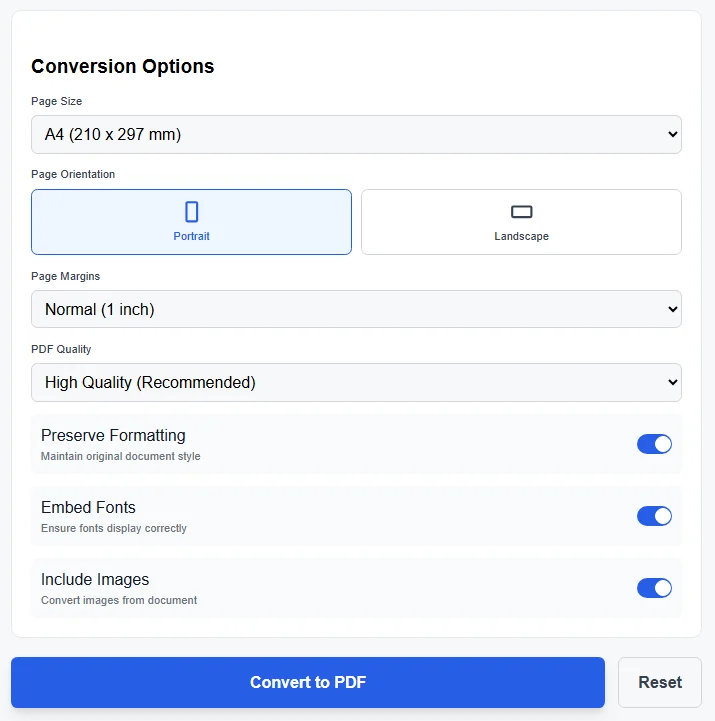
Conversion options screen while you Convert WORD to PDF. It shows page size, orientation, margins, pdf quality, font embedding, and preserve formatting options for accurate pdf output.
PDF Converter Features
This pdf converter supports multiple needs.
- Convert word documents to pdf format
- Create pdf files that look clean
- Handle multiple pdfs when needed
- Support pdf editing tools after conversion
- Enable compress pdf documents later
- Support sign pdfs and translate pdfs
This is an all-in-one pdf converter for daily use. It fits many pdf-related needs.
Supported Formats and Files
You can convert word, doc, and docx formats. The tool accepts doc or docx files from microsoft word and other word processors.
Supported items include
- word document
- microsoft word document
- microsoft document
- word docs
- docs
The output includes pdf format files and pdfs ready for sharing.
Why Convert Word to PDF
Pdf is a ubiquitous pdf standard. It opens the same everywhere. A pdf file protects layout and content.
Word processors can change spacing. Pdf files do not. This helps when sending files for print or review.
Businesses use pdf tools for stable sharing. Schools use pdf documents for exams. Teams use pdf files for records.
Free Convert Word with Ease
You can free convert word files online. There is no signup. You get an ad-free conversion experience.
This online word solution works in your browser. It is an easy word workflow for fast file conversion.
You upload once. You convert once. You download the converted files.
PDF Gear and All in one Tools
Pdfgear software focuses on simple file conversion. Pdfgear offers tools that support daily work. Pdfgear offers features for create and manage documents.
Free pdfgear software helps users convert and manage files. Pdfgear offers an all-in-one pdf solution with high-quality pdf tools.
Pdfgear software supports document tasks without heavy setup. Pdfgear offers value for users who want control.
Compare with Adobe Tools
Adobe tools like acrobat online converter are popular. This tool gives similar results for conversion. You get a clean pdf without complex steps.
You do not need microsoft office or adobe software installed. The online converter does the work.
Use Cases for Converted PDFs
- Share professional-looking pdfs with clients
- Create print-ready pdfs for offices
- Store pdf files for document management
- Send converted document for approval
- Archive documents safely
The pdf files remain stable across systems.
How the Conversion Works
- Select word file
- Upload docx or doc
- Start convert
- Create pdf
- Download converted pdf file
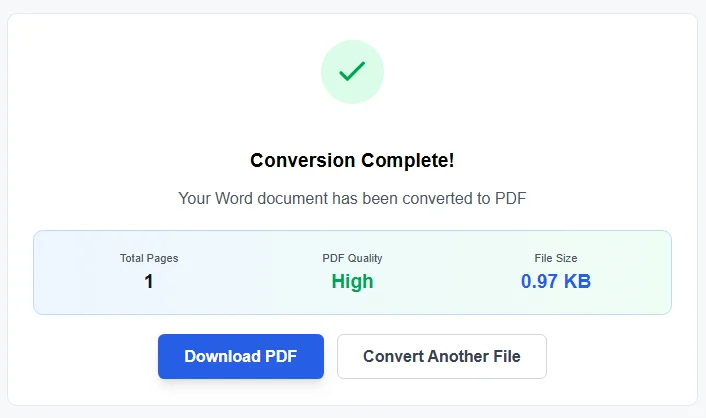
Conversion complete screen after you Convert WORD to PDF. It shows total pages, pdf quality, file size, and download option for the converted pdf file.
The process is simple. The result is reliable.
Final Notes on Word to PDF Conversion
This tool helps convert word to pdf with speed and care. It supports microsoft, ms word, and other word processors. It produces pdf documents that look right.
If you need format conversions for work or study, this online pdf tools set helps. It supports word excel ppt needs through word excel and ppt workflows.
You get clean pdf files. You get control over content. You get results you can trust.
For external reference on pdf standards, see documentation from ISO PDF standard .