
Delete Pages
Remove unwanted pages from your PDF document
Click to upload or drag and drop
PDF files only (Max 50MB)
Click pages to delete
Deleting Pages…
Processing your document
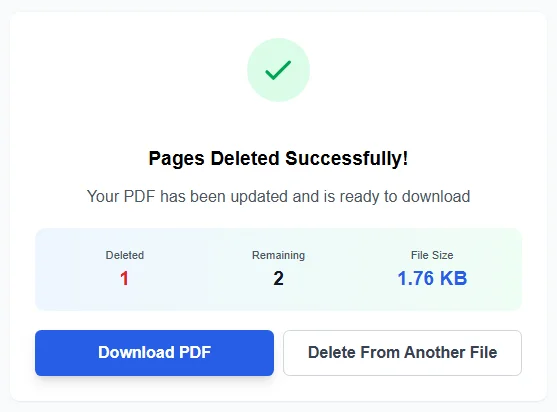
Pages Deleted Successfully!
Your PDF has been updated and is ready to download
Deleted
–
Remaining
–
File Size
–
Delete Pages from PDF
Deleting pages from a PDF should not feel hard or confusing. Many users only want to remove a few unwanted pages and save a clean file. This guide explains how a Delete Pages from PDF tool helps users manage PDF pages with ease.
Delete PDF Pages Online with Ease
A modern PDF page remover allows users to delete pages from PDF files directly in a browser. No software install is required. The tool works with a simple upload, preview, and delete process.
Users can delete PDF pages in seconds while keeping the rest of the pdf document intact. The process is quick, clear, and safe.
Why People Delete Pages from PDF Files
PDF files often contain extra or unneeded pages. These may include blank pdf pages, draft content, or confidential pages.
Removing these pages helps users create a clean and updated pdf. It also reduces file size and improves sharing.
- Removing unwanted pages before sharing
- Cleaning a pdf file for printing
- Dropping old content from a document
- Creating a new pdf document for work or school
How the PDF Page Remover Tool Works
Upload a PDF File
Users start by uploading a pdf file into the tool. The tool supports common pdfs and large documents.
Preview Page Thumbnails
Each page appears as a page thumbnail. These thumbnails give a clear view of pdf pages before any action.
Page thumbnails help users select the exact pages they want to remove. This avoids mistakes.
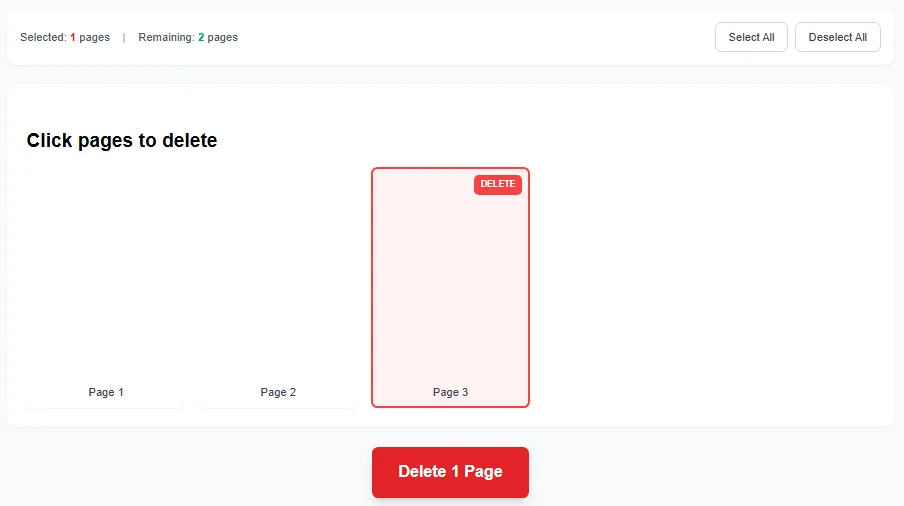
Select Pages to Delete
Users click on thumbnails to mark pages. Selected pages are clearly shown. This makes it easy to delete pages without guessing.
Remove Pages and Save
After selection, the tool removes pages and creates a new pdf file. The original content stays unchanged except for the deleted pages.
The result is a clean, updated pdf ready to download.
Delete Pages from Your PDF Quickly with Our Free, Online PDF Page Deleter
This free pdf page remover is built for speed and clarity. Users can delete pages from your pdf quickly with our free, online pdf page deleter and get instant results.
No signup is required. No watermarks are added.
Benefits of Using an Online PDF Page Tool
- Works on all devices
- No need for free pdf software downloads
- Simple layout and clear steps
- Safe handling of pdf text and images
This makes it ideal for daily pdf tasks.
Remove Pages Without Breaking the Document
Removing pages does not damage the pdf document structure. The tool keeps layout, fonts, and images intact.
Users can remove pages while keeping links and formatting stable.
Use Cases for PDF Editing Tools
A delete pages feature fits into a larger set of pdf editing tools. Many users combine it with other actions like extract pages, insert pages, or split pdfs.
These tools support online pdf organizing and advanced pdf tools workflows.
Built-In PDF Editor Features
- Page remover tool
- Page thumbnails for preview
- Support for new pdf creation
- Options to create a new pdf file
This helps users manage pdfs—all in one place.
Delete Pages from PDF for Work and Personal Use
Students remove unneeded pages from notes. Offices clean acrobat pdf page files before sharing. Businesses remove confidential pages before sending documents.
The tool adapts to all needs.
Security and File Handling
Files are processed securely. The tool focuses only on the selected pdf task and does not change other content.
Once the updated pdf is ready, users can download it and continue their work.
More Than Just Delete Pages
- Translate pdfs
- Sign pdfs
- Insert pages into a document
- Create a new pdf from selected pages
These features help users manage pdf online with confidence.
Trusted PDF Tools Online
Reliable pdf tools focus on speed, clarity, and ease of use. Some users compare tools like pdfgear or visit platforms such as online PDF remover tools when choosing solutions.
A good remover tool keeps the process simple and transparent.
Final Thoughts on Deleting PDF Pages
Deleting pages should not slow users down. A clear interface, visible thumbnails, and fast processing make the task simple.
With the right pdf page remover, users can remove unnecessary pages and keep their documents clean and professional.