
Merge PDF Files
Combine multiple PDF files into one document
Upload PDF Files
Drag & drop your PDF files here or click to browse
Select multiple PDF files to merge
PDF Files Ready
0 file(s) selected
PDF Files
Use arrows to reorder
Merge Info
Files will be merged in order
Merging PDFs…
Please wait while we combine your files
PDFs Merged Successfully!
Your files have been combined into one PDF
Files Merged
0
Total Pages
0
Merge PDF Files Online for Free
Merge PDF Files into One Single Document
Merge PDF files when multiple documents need to become one clean file. This merge PDF tool helps users combine pages without software. It works in the browser and supports the standard PDF file format.
The goal is simple. Turn multiple PDF files into a single document in the right order.
What Is a PDF Merge Tool?
A PDF merge tool joins several PDF documents into one merged PDF file. Users upload files, set order, and click merge. No install. No signup. No watermark.
This tool acts as a fast PDF merger for daily tasks.
How to Merge PDF Files Online
Step-by-Step Process
- Select files from the device
- Drop files into the merge area
- Arrange pages if needed
- Click merge files
- Download the final document
The result is a new PDF file ready to share. This makes PDF merging easy for everyone.
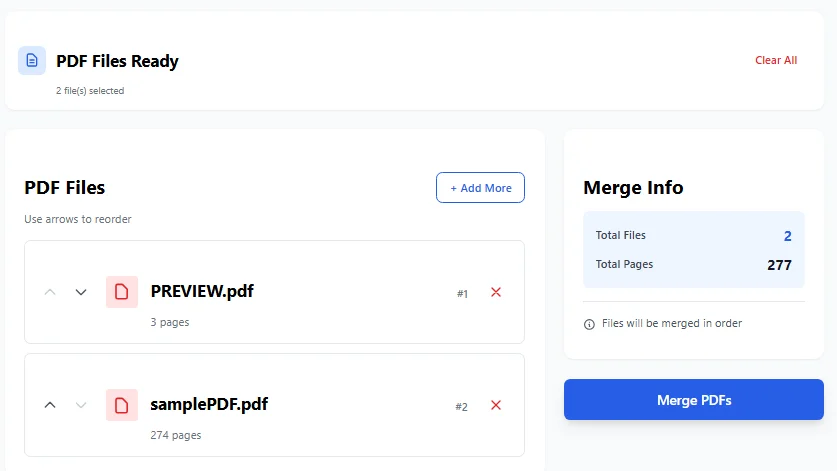
This intuitive merge interface allows users to easily upload and arrange multiple JPG images or PDF files using a simple drag-and-drop system. The tool displays file previews, page counts, and merge settings including page size, orientation, and image quality options before converting to a single PDF document.
Combine PDF Files Without Software
Many users rely on heavy tools like Adobe Acrobat. Some try services like PDF24 or an Acrobat PDF combiner. This tool removes that need. It works as a single document, no software solution.
Everything runs in the browser. That makes it a true offline PDF solution once loaded.
Merge PDF Files for Free Into a Single Document
This tool supports free merge PDFs with no limits on daily use. Users can easily combine multiple PDF files into one for free. There are no hidden steps. The process stays clean and clear.
The output is a smooth merged PDF with all pages intact.
Fast and Secure PDF Merging
Security matters when handling files. This tool processes PDFs locally. Files are not uploaded to a server. That keeps secure PDFs safe.
It also acts as a fast PDF merger, even with large documents.
Manage Pages and Order Easily
Users can move pages up or down. They can merge pages in the right sequence. Each PDF file shows page count. This avoids mistakes before merging.
The tool merges files exactly as shown. Similar to how you can organize PDF pages, this merger gives you complete control over file arrangement.
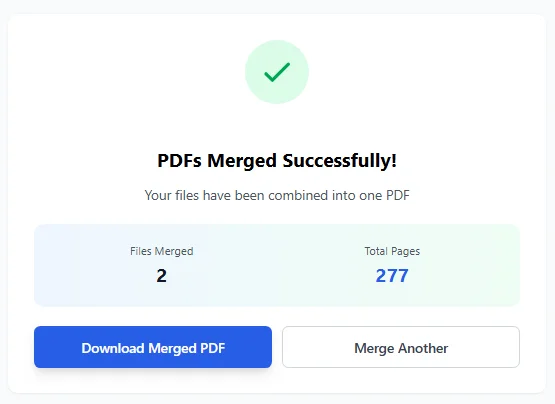
The success screen displays the completed merge operation, showing that 277 individual images have been successfully converted and combined into one comprehensive PDF file in A4 format. Users can immediately download their merged PDF or start another conversion with the ‘Convert Another’ option.
Works With Multiple File Types
The tool focuses on PDF files, not image files. It respects the original file format. Each file keeps layout, text, and structure.
The output stays compatible with Adobe readers and browsers.
Use Cases for PDF Merge Tool
This PDF tool helps in many cases:
- Create one report from many PDFs
- Share files as one attachment
- Prepare a new PDF for printing
- Combine forms into a single document
It also supports simple compilation work. If you need to work with other formats, you can also convert Excel to PDF before merging.
What This Tool Does Not Do
This is not a compress PDF tool. It does not split PDF files. It does not sign PDFs.
Those tasks need separate tools. This one focuses only on merge and does it well.
Why People Prefer Merge PDF Online
- No install
- Clean interface
- Works on all devices
- No ads blocking flow
This makes merge PDF online the top choice. Many users call it a simple combiner and merger. For more options, check out other popular PDF merge tools.
Built-In Merge Function That Just Works
The tool uses a built-in merge function. It handles multiple files without errors. Each PDF page stays sharp. The output feels professional.
That’s why users trust this PDF merge tool.
Share and Use the Final PDF
After merging, users can share files easily. The final document opens on any device. It works with email, cloud, and Google integration workflows.
The new PDF stays light and clear.
Summary
This tool helps combine PDF files into one smooth file. It acts as a reliable PDF merger for daily use. From upload to download, the process stays simple.
No clutter. No stress. Just clean merging done right.
Frequently Asked Questions (FAQs)
What Exactly Does Merge PDF Files Mean?
Merging PDF files is all about taking two or more PDF documents and smashing them together into one single document – and we keep the order exactly as you pick it.
Do You Have to Pay to Merge PDF Files Online?
Good news: merging PDF files using this tool is completely free, and you don’t have to sign up or pay a dime.
How Many PDF Files Can You Merge at Once?
We let you merge as many PDF files as you need in one single hit – our bulk file selection makes it super easy to get all your files combined at once.
Does the Quality of the PDF Files Get Lost?
No way – the merged PDF file keeps all the original layout, text and PDF pages 100% intact – no quality loss whatsoever.
Is the PDF Merge Tool Secure?
You can breathe easy – we process all files right in your browser, which means your PDFs stay safe and private.
Do You Need Adobe Acrobat to Merge PDFs?
No way – you don’t need Adobe Acrobat at all – our online PDF merger tool lets you merge files without any software needed.
Can You Reorder the PDF Pages First?
Yep – you can definitely move files up or down in the list to get the order just right for the final merged document.
Does the Tool Work on Mobile and Desktop?
Yeah it does – our merge PDF online tool works smoothly on desktop, tablet and even mobile devices.
Will the Merged PDF File Open Everywhere?
Absolutely – we make sure the new merged PDF file follows standard PDF file format, so it opens up in all PDF readers no problem.