
PDF to XML
Convert your PDF documents to structured XML format
Click to upload or drag and drop
PDF files only (Max 50MB)
Converting to XML…
Extracting text and structure from your PDF
Pages
–
Characters
–
XML Size
–
XML Preview
PDF to XML conversion helps users turn static files into structured data. A PDF to XML tool extracts text and layout and converts them into readable xml documents. This makes data easier to store, search, and reuse.
What Is PDF to XML Conversion
PDF to XML is a process that converts pdf files into xml files. XML uses tags to define structure. These tags help systems understand content clearly.
PDF files use the portable document format (pdf). XML uses a text-based format. This difference makes xml more flexible for data handling.
Why Convert PDF Documents to XML
Many users work with pdf documents daily. These documents look good but are hard to edit or reuse. XML solves this problem.
Key reasons include:
- Easier access to pdf content
- Better control over pdf data
- Support for xml-based formats
- Use in software and application workflows
How the PDF to XML Tool Works
Upload PDF File
Users upload pdf file using a simple upload area. The tool accepts application/pdf files and checks file size.
Extract PDF Content
The tool reads the pdf file format and scans every page. Text is extracted from the entire document.
Generate XML Structure
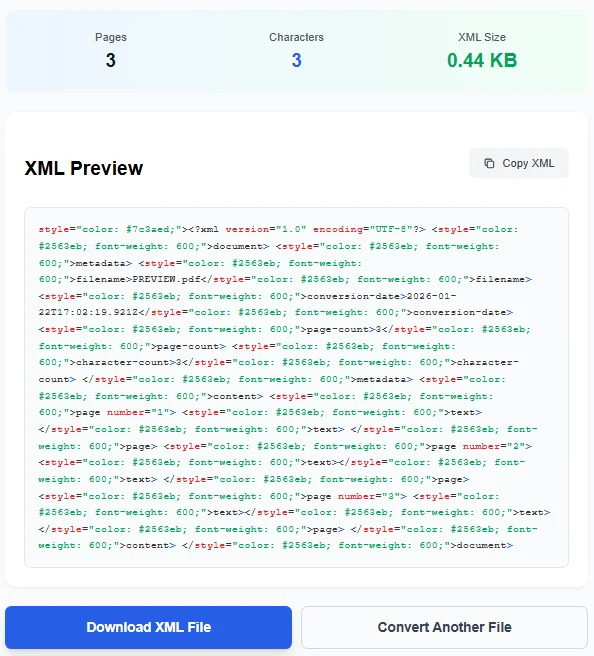
The system creates a generated xml file. Each page is placed inside its own xml element. This keeps structure clean.
Download XML File
After conversion, users can download the xml file. The original document remains unchanged.
XML Preview and Editing
The tool shows a live xml preview. Users can copy text or review structure.
This preview works like a basic xml editor. It helps users verify xml describes the content correctly.
Understanding XML Output
The xml output includes:
- Metadata
- Page numbers
- Extracted text
Each page uses a separate xml element. Users can also create their own xml element later if needed.
Supported Formats and Types
The tool supports:
- xml
- xmls
- application/xml
- text/xml
- application/xml text/xml
These formats work with many systems and tools.
PDF and XML Differences
PDF is designed for viewing. XML is designed for data.
PDF:
- Fixed layout
- Used for printed document sharing
- Common in adobe acrobat
XML:
- Flexible xml structure
- Easy to export and reuse
- Works across platforms
Use Cases for PDF to XML
PDF to XML helps in many cases:
- Data archiving
- Content migration
- Document analysis
- Interactive content creation
It also helps when working with popular document types.
Compatibility with PDF Software
PDF files are often created using adobe tools. Adobe systems popularized the ubiquitous pdf format.
Tools like adobe acrobat online or adobe editor focus on viewing. XML focuses on structure.
Some users compare tools with pdf pro, innovative pdf, or feature-rich pdf solutions.
Technical Background
PDF was introduced by adobe systems. XML is widely used in software applications.
Some systems also rely on xpdf or pdf viewer engines to read pdfs before conversion.
Accuracy and Structure
The tool keeps page order correct. Each page is tagged clearly.
This ensures the original document structure remains intact inside xml documents.
Security and File Handling
Files are processed securely. The tool works on the document file only during conversion.
Once complete, users can remove files or upload another pdf.
Export and Reuse XML Data
XML files can be reused in:
- Databases
- Web applications
- HTML rendering
- Data pipelines
This makes XML a strong document format choice.
PDF to XML for Developers
Developers prefer xml files for automation. XML supports clean data parsing.
This helps convert pdf documents into machine-readable formats.
Final Thoughts
PDF to XML conversion saves time and effort. It turns static documents into structured data.
With a simple tool, users can upload pdf file, convert content, and export clean xml.